Desertcart purchases this item on your behalf and handles shipping, customs, and support to Andorra.
🚀 Triple your screen, triple your productivity—because one monitor is so last decade!
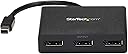
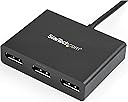
The StarTech.com 3-Port Multi Monitor Adapter leverages MST technology to connect three DisplayPort monitors via a single Mini DisplayPort 1.2 port on Windows PCs. Supporting dual 4K30Hz and one 1080p display simultaneously without compression, it boosts productivity by enabling extended desktops. Compatible with major laptop and workstation brands, it offers a driverless, plug-and-play experience with a compact design and a 3-year warranty.


| ASIN | B00JLRBC7S |
| Best Sellers Rank | #11,655 in Audio & Video Connectors & Adapters |
| Brand | StarTech.com |
| Built-In Media | Video splitter - 3 ports |
| Color | Black |
| Compatible Devices | PC |
| Connector Type | DisplayPort |
| Current Rating | 1 A |
| Customer Reviews | 4.0 out of 5 stars 800 Reviews |
| External Testing Certification | CE, FCC, REACH |
| Finish | Hdmi |
| Global Trade Identification Number | 00065030851879 |
| Item Dimensions | 7.9 x 3.1 x 0.8 inches |
| Item Type Name | Signal Splitter |
| Item Weight | 3.04 ounces |
| Item dimensions L x W x H | 7.9 x 3.1 x 0.8 inches |
| Manufacturer | StarTech.com |
| Mfr Part Number | MSTMDP123DP |
| Model Number | MSTMDP123DP |
| Number of Items | 1 |
| Number of Ports | 3 |
| Package Quantity | 1 |
| Power Plug Type | No Plug |
| Specific Uses For Product | personal |
| UPC | 065030851879 |
| Unit Count | 1 Count |
| Warranty Description | 3 Year |
| Warranty Type | Extended |
P**L
Great quality, works as expected. (Flickering addressed below)
I bought two of these and two StarTech mini display port extension cables - Perfect combination for both my home and office setups. I'm running my laptop screen and three 19" full screen monitors simultaneously - with no issues. We ended up getting a few more of these at work after seeing how well they work with my setup. This hub works just as advertised and is worth the money. Those who reported issues of flickering screens are most likely experiencing issues with their own computer hardware (graphics card) and not this device. When I first plugged the hub in, two of the monitors kept flickering - it drove me nuts. Then, I realized I was running all 4 screens off of the chincy Intel on-board graphics card in my laptop. I immediately switched over to the NVIDIA 1060 and haven't had a single monitor flicker since. Basically, make sure your GPU can handle however many monitors you're trying to display across, before just assuming it can handle it - and you should be golden.
J**T
New model works - Updated **
I was contacted by StarTech support. Apparently, there was a known issue with the model and they sent a updated adapter for free that works great! Kudos for that. Only bad thing is the actual Mini DP cable is only about 4 inches long. So if you use the DP directly from the Surface Pro the Display Port hub just hangs from the port and the cable isn't long enough for it to go to the desk. This isn't such a big deal if using the dock. Original: I got it in and my Surface Pro 3 barely ever detects it whether it's on the Dock or directly plugged into the device. Also, when it actually does detect it port 2 will never display video I have to use 1 and 3. I contacted StarTech and they said it would be 4 weeks to process a RMA really? I contacted the seller from Amazon so we will see what happens if I just got a bad unit.
D**W
Good for early adopters
This is a product for early adopters. If you understand its limitations it works quite well. 1. Software support -- you need a recent operating system in order to support DisplayPort MST. I am using an old installation of Ubuntu 14.04 which works well after you run the software updater to update to kernel version 3.19. New installations of 14.04 or later work out of the box. 2. Frame rate flakiness -- I get the occasional screen flicker when running two displays at 1080p 60Hz. Changing my display mode to 1080p 50Hz fixes the flickering problem with no discernible difference in image quality. 3. Wiring -- the input leads are quite short and if your USB port is not right next to your mini-DisplayPort then you are in trouble. I am using both a mini-DisplayPort extension cable and a USB extension cable. 4. The outputs are full-size DisplayPort and I can confirm that they ARE compatible with DisplayPort-to-HDMI cables/adapters. I am sure that all of these kinks will be worked out in new product releases over the next year or two. For now, if you buy this product, expect to do a bit of tinkering to get everything working smoothly.
E**E
Works, but has some problems
This MiniDP-to-3x-DP hub works, but has some quirks and limitations. Reason for purchase was to connect 3 1440p @ 60Hz monitors to one desktop computer. The graphics card had a DP and an HDMI output. The monitors are ViewSonic VX2478-SMHD 24" IPS 1440p Frameless LED Monitor HDMI, DisplayPort 1440p monitors. The computer was running Ubuntu 17.04 Linux and had an Nvidia GTX 1050 Ti card. Pros: - Allows more monitor connections than would otherwise be possible with some graphics cards (including my GTX 1050 Ti). - Works reasonably well out of the box to connect 2 1440p @ 60Hz monitors to a single DP port. No drivers or other setup is required. - Audio transport over DP works with up to 2 monitors connected. - Connection of 3 1440p@60Hz monitors is possible, although it works poorly. - Compact, has a small footprint. Major issue (docked one star for this reason): - When 2 or 3 1440p@60Hz monitors are connected, one of them keeps flickering: it keeps switching off randomly about once every minute, going blank for 2-3 seconds, and then come back on. This is the main issue. Quirks/limitations/cons (docked one more star for these reasons): - Even though it has 3 DP outputs, this MST hub does NOT support 3 1440p@60Hz monitors. Apparently 3x1440p@60Hz exceeds the bandwidth of the device slightly (an answer on Amazon states that each 1440p@60Hz monitor takes about 35% of the bandwidth of a device, so 3 would need about 105% of the available bandwidth). Even so, it's possible to connect and use 3 1440p@60Hz monitors with this hub. But: 1) The computer doesn't see the monitors when it is turned on. There's a "Scan" button on the MST hub that must be pressed twice about 30 seconds apart for the monitors to be recognized correctly; you have to go to the hub and do this every time the computer boots or the monitors sleep due to idling. 2) There is no sound transport in this scenario. - Does not seem to output 1440p When I connected a monitor to this MST hub using a DP-to-HDMI cable. The max recognized resolution was 2048x1152@60Hz. If the monitor is connected directly to the computer using a standard HDMI cable, the resolution was 1440p@60Hz as expected. - Switching off one monitor causes the hub to reset. Overall, this is a useful device that has one major issue (monitors seem to blink off and back on occasionally at random intervals). It also has some other quirks but these are relatively minor.
N**.
Usually Problems with this device are related to O/S
So I have been using this product for about 2 years on my Microsoft Surface Pro. At first, it worked and then sporadically didn't. Very frustrating, but it never really seemed to be a problem with the device. What it is doing is fairly simple and it seemed more of a Windows problem. Low and behold it was. Windows went through several patches to support upgrading its Mini Display Port capabilities. When 10 came out, everything quit working but soon thereafter a couple of patches the MST is working great and I can say that I have had no issues for about a year. Very happy with the product and glad I stayed with it. Would recommend it, but not for a novice just for the simple fact that there can be some O/S complications that need to be worked through.
F**S
Avoid, avoid, avoid.
This thing is straight-up garbage. I have a Surface Pro 3 and wanted to set up a three-screen workstation in my office with my Microsoft Dock. In theory, this was simple - walk in, dock the tablet, have it disable its' own screen (since the Surface Pro 3 can only drive 3 displays, maximum), and then send the video over to my 3x 1920x1080 ASUS monitors. I was using Displayport to HDMI cables from the MST Hub to the back of each screen, cables that I have confirmed are working and fine on other setups in the office. In practice, this hub is incapable of running more than one monitor, which makes it nothing more than a glorified displayport adapter. The moment I plugged more than one screen into the adapter, everything would stop working; screens would flicker from working to black once a second, the computer would make the device-connected, device-disconnected noise repeatedly, and it was impossible to use the computer in any capacity until the MST Hub was unplugged. I read some other reviews here on Amazon and saw people saying they had similar one-screen problems. I also saw that the manufacturer was responding indicating that the chipset might be the issue, and that there was a newer, updated version that was more consistent and reliable with the Surface Pro 3 specifically. Knowing that, I called the manufacturer to try and find out what I could do to troubleshoot the problem, or to ascertain if I had an 'old' adapter. Sadly, the representative on the phone confirmed the make and serial number of my adapter as their newest version, so an easy fix was not to be had. We then spent a considerable amount of time trying to troubleshoot other issues with the adapter, including making sure that I had the exact and specific Intel Graphics Drivers that Startech recommended for use with the MST Hub (which was a pain unto itself to install on a Windows 10 setup, but I did get it done just to rule out any other issues) and ruling out the Microsoft Dock as part of the problem (unsurprisingly, not the issue). After days of troubleshooting on the phone with Startech support, they ultimately decided that the device I had was faulty and my best recourse was to return it to Amazon and get a new one, which I did. New one arrived yesterday. Also part of the 'new' chipset. Also completely worthless. Same symptoms, same results. Any time I have more than one monitor plugged in, the device completely stops working. I have wasted a ton of time and energy trying to get this device working and it has been fruitless. I'd recommend you read the other reviews cautioning against their device, as I did, and actually take that advice, as I didn't.
T**U
Working like a charm with Surface Pro 3 i5 and Asus Monitors
I wanted to connect two monitors I have to my Surface Pro 3. After doing a research, I found out that there are few dependencies to get to extend your SP3 to 2 additional screens, one of them is the model of the SP3 you have. Anyway, after buying this, I managed to connect my 2 ASUS monitors using a DisplayPort -> HDMI cables. These cables were connected to this piece of Mini Display Port that I bought from Amazon and it's working well. Now, when I bought this piece, I wanted to use it for my SP3 as well as for me MacBook Air. That being said, it did not work with MacBook Air which I have. After doing a research, I found out there are few elements a person should research before buying or investing in such a piece. 1. Make sure your graphics card is capable of extending into few additional monitors and the resolution it can extend into to. (It was important for me to get the SP3 to extend at 1920*1080 on both 27" monitors. Without a graphics card that can do that, this piece may not be able to give achieve this. 2. Make sure your get the right cables. I got this piece and I overlooked the fact it is Mini DisplayPort to DisplayPort converter, I "assumed" it was to HDMI. Nonetheless, I managed to go to a local shot and instead of buying DisplayPort to HDMI converters, I invested in 2 DisplayPort to HDMI converters. Some of the cables I tried at the shop were faulty and hence after trying 5, we managed to find 2 that were working. 3. Finally, make sure the graphics card driver is up to date. Check the driver website of your monitor manufacture and download/install the latest drivers. Good luck!
K**S
Great product, works as advertised!!
I don't write many reviews on products, but I wanted to on this one. Recently there have been a lot of negative reviews on this product from people having issues getting two monitors to function with this unit so I was a little unsure of purchasing this. I have not had that problem. I own a Microsoft Surface Pro 3 upgraded to Windows 10. I have the Surface Pro 3 docking station that only has 1 mini display port. I wanted to be able to use 2 full size monitors while having my surface docked and not have to have one pluged into the side of the Surface, so I purchased the StarTech Multi Monitor Adapter with two display ports. I then purchased two Display Port to DVI cables. Got everything hooked up and it works flawlessly after adjusting the display settings. I currently only use the two large monitors I have and keep the surface screen off, but with this set up I could run all three screens. When the Surface wakes up from sleep mode the screen flickers a little, but goes right back to the settings I have.
J**A
Barato y con limitantes
No sirve en Mac, estaba barato y lo probaré algún día en PC, no se compara con una matrox
M**O
Enviaron el articulo equivovado
Nefasto!!!! Solicite con urgencia este producto y me envían una unidad externa de cd, que falta de atención. Confie que el dia de hoy recibiría el producto y lo unico que tengo son 2 problemas una actividad mas que me quita tiempo (devolución) y volver a buscar el producto! PESIMO
M**K
Reliable Tech Brand.
fantastic and reliable product and brand, does the job.
T**K
Didn't work for me
Didn't work for me. Apparently it can't draw enough power from the laptop for my 2 gaming monitors which led to my monitors flickering on and off. Might be ok for other monitors or even a single. Not sure.
K**R
Na endlich!
Vorab, ich habe diese Gerät weder "verbilligt", noch geschenkt bekommen und würde mich für den kleinen Vorteil auch nicht prostituieren. Diese Rezension kommt also aus "tiefstem Herzen" und ohne Interessenkonflikte. Eigentlich ist diese Rezension eine mit 4.5 Punkten, da es das hier aber nicht gibt, gilt: "in dubio pro reo" Ausgangslage: Alienware 17 R4 Notebook mit einem Mini-DP und einem HDMI Port on Board, soll in einem professionellen Environment zum Betrieb von drei externen Monitoren gleichzeitig benutzt werden. Alle drei Monitore werden unter Win10 Pro mit 1440P betrieben, zweimal Dell Ultrascan, einmal Panasonic UHD TV. Bild soll gespiegelt werden, also alle drei Monitore sollen das gleiche 1440p Bild zeigen. Abstand der Monitore zum Rechner knapp 10 Meter aus einem Serverraum heraus, also im Grenzbereich für eine DP - Verbindung. Theoretisch war diese Vorgabe leicht umzusetzen, einfach einen USB-C/Thunderbolt auf DP Adapter nutzen und schon hängen drei Monitore am Notebook. Blöderweise kann man den Monitor via Thunderbolt zwar in Win10 konfigurieren, der nVidia Treiber erkennt den Monitor aber nicht, da er nicht direkt am Board hängt und das ist aufgrund bestimmter Funktionalitäten hier zwingend. Also muss ein weiterer DP Anschluss direkt ans Board und DP over Thunderbolt ist keine Option. Weiteres Problem war, dass ich geschlagene 3! - in Worten DREI - Mini-DP auf DP Adapter hier über Amazon gekauft und versucht habe, um den Hauptmonitor mit seinem DP Anschluss an den Mini-DP Port der Alienware zu bringen. Alle drei Adapter haben NICHT funktioniert. Die einen flackerten, die anderen brachten gar keine Bild. Absurderweise konnte ich aber in einer viel längeren und komplexeren Konfiguration eine Verbindung herstellen. Fehlerursache waren also die drei Adapter, alle drei wohl der gleiche China-Schrott. Natürlich mal wieder mit endlos guten Beurteilungen, den Rest können Sie sich denken. Ein älterer 1zu3 Club 3D DP Adapter gab auch kein Bild. Wahrscheinlich ohne Firmware für die letzten DP Revisionen. Ich wollte schon frustiert aufgeben, da entschloss ich mich, es mit diesem Produkt zu versuchen. Das sah mir relativ neu im Produktzyklus aus und ich hoffte eine brauchbare Firmware vorzufinden. Ich wurde nicht enttäuscht. Ich habe es verkabelt, an einen stromführenden USB Port angeschlossen und Voila! Ein 1440p Bild auf allen drei Monitoren. Heureka! Und vor allem: Im nVidia Treiber sind alle drei externen Monitore konfigurierbar. Ein Wunder, ich habe erstmal ein Dankesgebet gesprochen. ;) Einziger kleiner Wehrmutstropfen: Der zweite Monitor am Gerät, der mit dem längsten Kabel, flackert immer mal wieder. Ich vermute hier aber ganz stark ein Problem der Kabellänge, kann das aber bisher nicht 100% verifizieren. Insofern "nur" 4,5 Sterne, so lange ich die Ursache des Flackerns auf einem Monitor nicht kenne. Aber wenigstens funktioniert hier mal was, ich bin glücklich und zufrieden und weiter fasziniert, was hier für ein Schrott bei Adaptern angeboten wird und trotzdem massiv gute Bewertung hat. Wahrscheinlich alles "Produkt-Tester"; die sich natürlich gar nicht davon beeinflussen lassen, dass sie den Kram umsonst bekommen. Schon klar. ;)
Trustpilot
1 month ago
1 month ago